
Every return generates 2-3 support tickets. Learn how to automate returns on Shopify with AI, cut handling costs by 95%, and free your team for revenue-driving work.
How to Automate Returns on Shopify With AI (Save $1,000+/Month)
You already know returns are a problem. Every Shopify store owner does. But here's what most people get wrong: they think returns are a logistics problem. Ship the item back, issue the refund, move on. The truth is, if you automate returns on Shopify with AI, you solve the real bottleneck.
Returns are a support problem.
Every return starts with a conversation. A customer emails asking if their order qualifies. They message on Instagram wanting to swap sizes. They hit your live chat at 11 PM on a Sunday because the dress didn't fit and they need it for Friday. Each return generates two to three support touchpoints before anyone even prints a shipping label. And at a 17-20% return rate (that's the current Shopify average, by the way), those conversations pile up fast.
A store doing 1,000 orders a month? That's 170-200 returns. Multiply by 2.5 touchpoints each. You're looking at 425-500 support interactions just from returns. Not questions about your products. Not pre-sale inquiries that might convert. Just... people wanting their money back.
So yeah. Returns are your biggest support problem. And there's a fix that most merchants are completely overlooking.
Want to see what AI-powered returns handling looks like in practice? Book a quick demo →
The Real Cost of Manual Returns Handling
Let's talk money, because that's what actually changes behavior.
The average cost to manually handle a support ticket in ecommerce sits between $5 and $8. Returns tickets run higher because they're multi-step: the customer reaches out, your agent checks eligibility, your agent explains the policy, the customer has follow-up questions, and then someone actually processes the refund or exchange. That's not one interaction. That's a thread.
For a store processing 200 returns per month at $7 per ticket (conservative), you're spending $1,400 monthly just on return conversations. Not on the refund itself. Not on shipping labels. Just on talking about the return.
Here's what makes it worse: returns are almost entirely predictable. The customer wants to know three things:
- Can I return this?
- How do I return it?
- When do I get my money back?
That's it. Maybe 15% of return requests involve something genuinely complicated, like a damaged product or a warranty claim. The other 85%? Repetitive, policy-driven, answerable-in-seconds conversations that your human agents handle hundreds of times a month.
Which brings us to the two-layer solution most stores are only half-implementing.
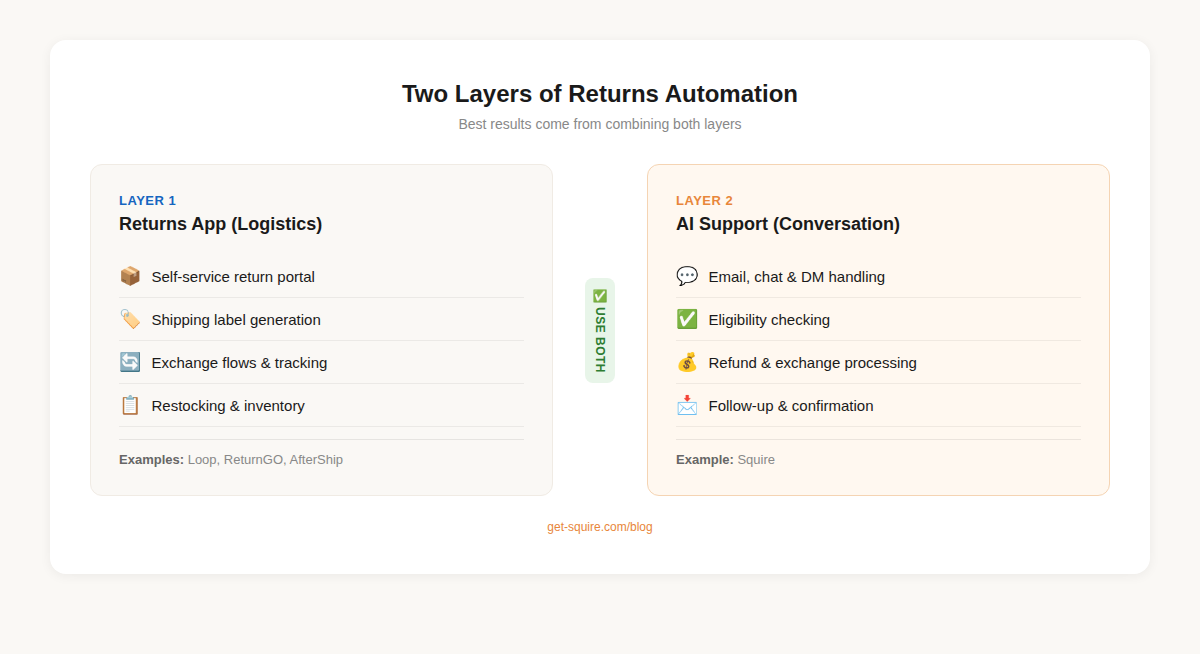
Two Layers of Returns Automation (You Probably Only Have One)
If you've been running a Shopify store for any length of time, you've probably looked into returns management apps. Loop, ReturnGO, AfterShip Returns, Rich Returns. They're everywhere on the App Store, and they solve a real problem.
But they solve the wrong half of the problem.
Layer 1: Returns Management Apps (The Logistics Layer)
Returns apps are great at what they do. They create self-service portals where customers can initiate returns, generate shipping labels, track return shipments, and manage exchanges. Some even do automated restocking once the item arrives at your warehouse.
If you don't have one of these, get one. Seriously. ReturnGO and Loop are both solid for Shopify stores. AfterShip works well if you're already using their tracking tools.
But here's the catch that nobody talks about: not every customer uses your returns portal.
We've talked to dozens of Shopify merchants, and the pattern is consistent. Anywhere from 40% to 60% of return requests still come through email, live chat, or social DMs. Customers don't want to find your portal, log in, look up their order number, and navigate a multi-step form. They want to message you and say "hey, I need to return this."
That's a support conversation. And your returns app can't handle it.
Layer 2: AI Customer Support (The Conversation Layer)
This is the piece most stores are missing entirely.
AI support tools handle the actual conversation that triggers a return. A customer emails "I want to return my order." The AI reads their order data, checks whether the item falls within the return window, confirms eligibility based on your specific policy, processes the return or refund, and sends a confirmation. Done. No human agent involved.
The difference between this and a returns portal is simple: the portal waits for customers to come to it. AI meets customers wherever they already are, in whatever channel they prefer.
And when you combine both layers? Your returns portal handles customers who prefer self-service. Your AI handles everyone who prefers to just... ask. Between the two, you've covered the full spectrum.
How AI Actually Handles a Return Request (Step by Step)
This isn't theoretical. Let's walk through exactly what happens when a customer messages your store about a return, using Squire as the example since we built it specifically for these Shopify workflows.
Step 1: The customer reaches out.
Could be email, live chat, Instagram DM, Facebook Messenger. Channel doesn't matter. "Hi, I received my order but the medium is too small. Can I exchange it for a large?"
Step 2: AI identifies the intent.
The AI recognizes this as a return/exchange request, not a complaint, not a general question, not a WISMO inquiry. It pulls the customer's order data from Shopify automatically. No "can you provide your order number?" back-and-forth.
Step 3: AI checks eligibility.
The AI reads your return policy. Is this item eligible? Was the order placed within the return window? Is this product category excluded from exchanges? (Some stores exclude sale items or intimates.) All of this happens in seconds, using your actual policy, not a generic template.
Step 4: AI processes the exchange.
If eligible, the AI initiates the exchange. For Squire, that means processing the size swap directly through Shopify. The customer gets a confirmation with return instructions and a timeline. If you've connected a returns app like Loop, the AI can trigger the return there too.
Step 5: AI follows up.
Confirmation email sent. If the customer has questions, the AI handles those too. If something goes sideways (damaged item, missing package), the AI escalates to your human team with full context. No blind handoff where the customer has to repeat everything.
Total elapsed time? Under 90 seconds for a straightforward exchange. Compare that to the 4-8 hour average response time for human-handled returns over email.
Setting This Up on Your Store
You've got two paths depending on your volume and complexity.
Option A: AI Support Tool Only
Best for stores processing fewer than 500 returns per month with straightforward return policies (30-day window, standard conditions, refund or exchange).
The setup is surprisingly simple. Connect your Shopify store, define your return policy in the AI's knowledge base, and let it handle incoming conversations. No flow-building, no decision trees, no if-this-then-that logic. Modern AI tools read your policy and apply it contextually.
With Squire, the whole setup takes about 15 minutes. Connect Shopify, connect your email or chat channels, tell the AI your return policy. It starts handling returns from the first conversation.
The limitation? No self-service portal. Customers can't browse and initiate returns on their own. If that matters to you (and at high volume it will), you want Option B.
Option B: Returns App + AI Support
Best for stores with complex policies, high return volume, or customers who expect a branded self-service experience.
Here's how the two systems work together:
- Returns app (Loop, ReturnGO, etc.) provides the self-service portal, generates shipping labels, handles logistics and restocking
- AI support (Squire) handles every conversation that comes through email, chat, and social. When someone asks about a return, the AI checks eligibility and either processes it directly or directs them to your portal
The key is that neither tool replaces the other. They cover different customer behaviors. Self-service-oriented customers use the portal. Conversation-oriented customers message you. Both get handled automatically.
What to Look For in an AI Tool for Returns
Not all AI support tools are created equal when it comes to returns. Before you commit, check these boxes:
- Direct Shopify order access. The AI needs to pull order data, check dates, and verify products in real time. If it's working from a static FAQ, it can't check eligibility properly.
- Policy comprehension, not just keyword matching. Your return policy has conditions and exceptions. The AI should understand "30 days from delivery, except sale items and swimwear" as a coherent rule, not just search for the word "return" in your help center.
- Actual processing capability. Can the AI issue refunds? Initiate exchanges? Or does it just draft a reply for a human to approve? If it's the latter, you've only automated the typing, not the work.
- Escalation intelligence. Returns involving damaged items, warranty claims, or high-value orders should route to humans. The AI should know its limits.
The ROI Math (It's Not Even Close)
Let's make this concrete with three store sizes.
Small store: 80 returns/month
That $40 AI cost assumes Squire's Starter plan ($49/mo for 100 conversations, covering returns plus your other support tickets). Your returns cost drops from $1,200 to effectively nothing.
Mid-size store: 300 returns/month
At the Growth tier ($149/mo for 400 conversations), the AI handles returns alongside WISMO queries, product questions, and everything else. One tool, one price.
Large store: 800 returns/month
At this volume, you're almost certainly employing at least two full-time agents just for returns. That's $6,000-$8,000/month in salary alone, before benefits and management overhead. Squire's Pro plan at $349/month handles 1,000 conversations. The math gets ridiculous.
You don't need a calculator to see where this is going.
Five Returns Automation Mistakes (And How to Avoid Them)
1. Forcing every customer through the portal.
Some customers will always prefer to email or message you. If your only returns option is a self-service portal, those customers are stuck waiting for a human agent to read their email at 9 AM Monday. Give them a conversational option.
2. Deploying AI that can't actually process returns.
This is shockingly common. Plenty of chatbots will explain your return policy beautifully and then say "I've forwarded this to our team." Congratulations, you've automated the wrong part. Look for AI that processes refunds and exchanges directly through Shopify.
3. Not connecting AI to your order data.
If the AI can't look up whether Order #4829 was placed 18 days ago and contains a non-sale item, it can't check eligibility. It's just guessing. Or worse, asking the customer to provide details that your system already has.
4. Ignoring the escalation problem.
Not every return is simple. Damaged goods, warranty issues, high-value items, customers who are genuinely upset. Your AI should recognize these situations and hand them to a human agent with full conversation context. Automating everything is how you get horror stories on Twitter.
5. Setting it up and forgetting about it.
Your return policy will change. Seasonal sales add exceptions. New product categories have different rules. Review your AI's policy knowledge quarterly, or whenever you update your return policy. Takes 10 minutes. Saves you from the AI approving returns on final-sale items.
Returns + WISMO: The Dynamic Duo of Support Automation
Here's a pattern we see with Shopify stores that nail their support automation: they start with WISMO tickets (the highest-volume, lowest-complexity ticket type) and then tackle returns next.
Between the two, you've just automated 50-70% of your total support volume. Those aren't made-up numbers. WISMO typically accounts for 30-40% of all ecommerce support tickets. Returns add another 20-30%. Handle both with AI and your human agents can finally focus on the conversations that actually need a human touch: complex complaints, VIP customers, product feedback, and pre-sale questions that drive revenue.
If you haven't set up AI customer support for your Shopify store yet, start there. The returns automation we've covered in this guide is one piece of a much larger shift in how ecommerce support works.