
AI customer support for Shopify explained — how it works, what it handles, tool comparison, and setup steps. Find the right AI agent for your store.
AI Customer Support for Shopify: The Complete Guide (2026)
I counted them once. Literally sat down on a Wednesday morning with my coffee going cold and tallied every support ticket a friend's skincare brand got in 24 hours. Two hundred and eleven. A hundred and sixty-something were "where's my stuff?" or some grammatical cousin of it.
That store had three full-time reps. Three humans, doing data entry dressed up as customer service.
Here's what changed my thinking on AI customer support for Shopify: it's not a chatbot. Not anymore. The tools shipping in 2026 pull live order data from your Shopify admin, check the carrier API, and fire back a specific answer — tracking number, estimated arrival, the works — before your rep finishes reading the subject line. We're talking about agents that process returns, not agents that link to your FAQ page and pray.
This guide is the one I wish existed when I started covering this space. What these tools actually do, what they cost when you read the fine print, which ones earn your attention, and how to roll one out without torching your customer relationships in the process.
Want to skip the 3,000 words and just try it? Squire has a 14-day free trial on the Shopify App Store. No credit card. No "onboarding specialist." No calendar Tetris.
What Is AI Customer Support?
Three species exist. They are not interchangeable and I'm tired of people pretending they are.
Rule-based chatbots are if-then machines wearing a friendly avatar. Customer types "return" and the bot regurgitates your return policy URL. Customer types "send this back" instead? The bot stares blankly. These things dominated from roughly 2018 to 2023, and they're the reason half the store owners I meet flinch when you say "chatbot." Fair enough.
AI copilots ride shotgun with your human agents. They draft a suggested reply; the agent tweaks it, hits send. Speeds things up, sure. But you still need the same headcount staring at the same inbox. It's like giving your dishwasher a faster sponge. The dishwasher is still standing there.
Autonomous AI agents are the category that actually matters. They ingest the ticket, query your Shopify admin for live order data (tracking, fulfillment status, return eligibility), decide on an action, and execute it. No human in the loop for the straightforward stuff. When something's gnarly or emotionally charged, the agent escalates — but hands over full context so your rep doesn't start the conversation from scratch.
Quick illustration. Customer writes: "I ordered a jacket last week and it hasn't shown up. What's the deal?"
Rule-based chatbot: "Please check your email for tracking information." Thanks for nothing.
Autonomous AI agent: pulls the order, pings USPS, responds: "Your jacket shipped February 3rd via Priority Mail. It cleared the Memphis sorting facility this morning and should arrive Thursday. Here's your tracking link." Eight seconds. Done.
That gap — between parroting a canned response and actually resolving the problem — is why 73% of e-commerce leaders now rank AI support as a top-three priority for this year.
How AI Customer Support Works on Shopify
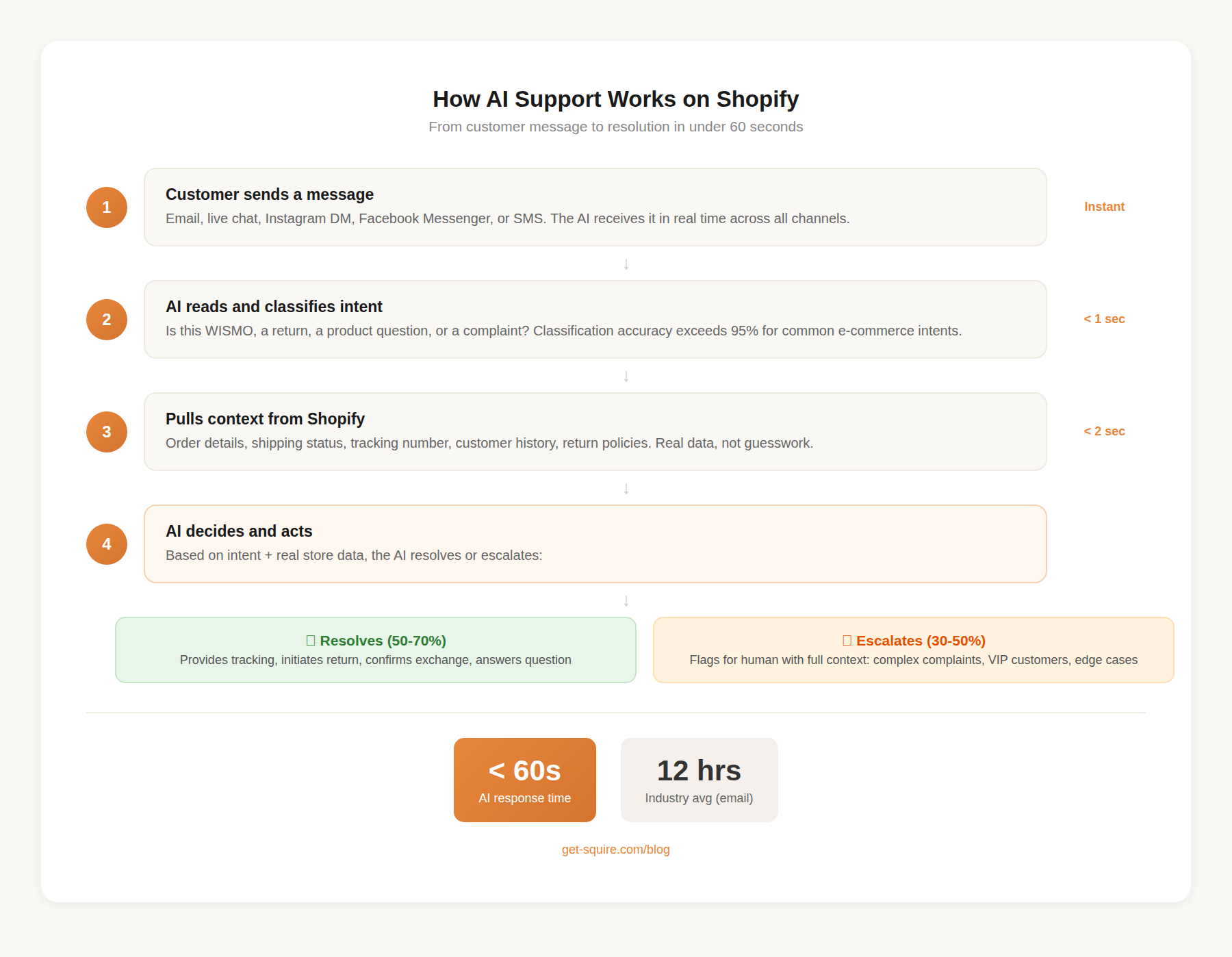
Five steps. Under a minute, start to finish.
1. Ticket lands
Email, Instagram DM, live chat widget, Facebook Messenger. Doesn't matter. The AI agent watches all of them simultaneously, which is something no human can do unless you count that one intern who tried and quit after four days.
2. Intent classification
WISMO? Return request? Billing confusion? Product sizing question? Passive-aggressive complaint? Modern LLMs nail common e-commerce intents above 95% of the time, and they classify in under a second. Faster than your fastest rep can open the ticket.
3. Shopify data pull
This step separates real tools from pretenders. A native Shopify integration means the AI reaches into your admin and grabs:
- Order specifics: line items, discounts applied, fulfillment state
- Shipping intel: carrier, tracking number, projected delivery date
- Customer profile: purchase history, previous tickets, lifetime spend
- Your store policies: return windows, exchange terms, whatever you've configured
Shallow integrations read data. Deep ones act on it — initiating returns, editing orders, checking real-time inventory, issuing discount codes. The difference matters more than most comparison articles admit.
4. Decision and action
Two roads. The AI either resolves the ticket directly (sends tracking info, kicks off a return, confirms an exchange) or escalates with full context attached. Good agents also tag a confidence score on every response. You can set thresholds: anything below 85% confidence gets routed to a human. Handy for the paranoid among us, and I say that affectionately.
5. Customer gets an answer
Seconds later. In your brand's voice, not robo-speak. Referencing their specific order, not generic boilerplate.
For context: the industry average first-response time for e-commerce email support is twelve hours. Half a day. For someone asking where their package is.
Twelve hours.
What AI Handles Well Today (With Real Numbers)
Not everything. Let me be clear about that upfront. But for certain ticket categories? The performance is almost comically good.
WISMO (Where Is My Order?) — 18-30% of all tickets
The cockroach of e-commerce support. Unkillable. Always there. Gorgias pegs WISMO at about 18% of incoming volume. Add the cousins — "has it shipped yet?", "can I reroute to my office?", "the tracking page says pre-transit, what does that mean?" — and you're hovering near 30%.
AI crushes these because there's no ambiguity. Pull order. Query carrier. Report status. It's a lookup, not a judgment call. Resolution rates approach 95%.
Returns and exchanges — 15-20% of tickets
Somebody wants to send something back. AI checks whether the item falls inside the return window, confirms eligibility based on your rules, generates the label. Boom. Shopify's own research shows that frictionless return processes directly predict whether someone orders from you again. So speed here isn't a nice-to-have. It's revenue protection.
Where AI taps out: damaged items that need photo review. Partial returns from bundles where the math gets weird. Customers who are two days past the window and want a favor. Those gray calls still need a person behind the keyboard.
Order modifications — 5-10% of tickets
"Wrong address." "Actually, cancel that." "Wait, can I add the matching socks?" Binary logic tied to fulfillment status. Hasn't shipped? Change it. Has shipped? Explain why you can't and offer what you can. This is AI's happy place.
Product questions — 10-15% of tickets
"Is this true to size?" "What's the fabric?" "Will it fit a 15-inch laptop?" If the answer lives in your product catalog, AI handles it. If the customer asks "would my girlfriend like this?" — well, the AI isn't a couples therapist. But those subjective questions are a sliver of the total.
Account and subscription stuff — 5-10% of tickets
Password resets. Plan changes. "Why was I charged twice?" Procedural, repetitive, and exactly the kind of work that makes good support reps update their LinkedIn at lunch.
The math: somewhere between 50% and 70% of a typical Shopify store's support volume is AI-resolvable right now. Industry benchmarks show 76-92% resolution rates on those ticket types. We've seen comparable numbers from stores running Squire.
What AI Still Can't Do — And Why That's Fine
Look, if a vendor tells you their AI handles 100% of support, walk out of the meeting. Or close the tab. Whatever the modern equivalent of walking out is.
Genuinely angry customers
Not "slightly annoyed." Genuinely furious. Caps lock. Threats to post on Twitter. Maybe a little profanity. AI can spot the rage and escalate fast, but it cannot do what a good rep does when they say "I hear you, I'm going to personally fix this." PwC found that 32% of customers bail on a brand after a single bad interaction. Your worst moments deserve your best people, not your cheapest automation.
VIP customers
Top 5% by lifetime value? Humans. Every single time. No exceptions. Most good AI tools auto-flag high-LTV customers and route them to a person. As they should.
Gray-area policy decisions
"I'm two days outside the return window but I've spent $4,000 with you this year." A skilled rep reads the room and makes the exception. AI follows rules. You can build in some flexibility — accept late returns for customers with five or more previous orders, that kind of thing — but truly judgment-dependent moments still need a human brain.
Multi-order spaghetti
One email, three different orders, two separate problems, and a question about a fourth order that might belong to their sister's account. AI can technically parse each piece, but stitching together a coherent response across all of it? Accuracy drops fast. Better to escalate.
Sensitive territory
A gift that arrived after a funeral. A product tied to a medical situation the customer didn't expect to share. Moments that require reading between the lines. AI is getting better at sentiment, genuinely, but contextual judgment for these situations? Not yet.
The smart framing: AI owns the 50-70% it's great at. Your team owns the 30-50% that demands creativity, empathy, and judgment. Nobody burns out on tracking number lookups. Customers get faster answers across the board. The math works for everyone.
How to Pick the Right AI Support Tool for Shopify
This part frustrates me because every comparison article I've read treats these tools like they're roughly equivalent. They're not. Picking the wrong one is like buying a sedan when you needed a pickup — technically both are cars, but you're going to have a bad time the first time you need to haul plywood.
Shopify integration depth
Non-negotiable. Some tools treat Shopify like a third-party afterthought — they can read order data, barely. Others are built natively for it and can actually take action: process returns, modify orders, check live inventory, apply discounts. When you're evaluating, ask one question: "Can your AI process a return inside Shopify, or does it just tell the customer to email us?" The answer tells you more than any feature matrix.
AI autonomy level
Three tiers, and the gap between them is enormous:
- Draft mode: AI writes a suggested reply. Human reviews, edits, sends. Training wheels.
- Auto-respond with oversight: AI sends replies on its own. Human reviews after the fact and corrects mistakes.
- Fully autonomous: AI resolves tickets end-to-end. Escalates what it can't handle. No human in the loop for the routine stuff.
Start with oversight if you're nervous. That's sensible. But buy a tool that goes all the way to autonomous, because you will want that capability six months from now and switching platforms mid-stride is a special kind of misery.
Pricing reality
E-commerce support volume is spiky. BFCM might 4x your normal volume. A product launch might 3x it. A TikTok video might 10x it overnight and nobody planned for that. So look hard at how pricing scales:
- Per-conversation: You know the unit cost. Totals fluctuate with volume. Predictable per ticket.
- Per-seat: You pay per human agent. Makes zero sense for an AI-first tool. Zero.
- Per-resolution: Pay only when AI resolves. Sounds elegant until you multiply $0.99 by 2,000 resolutions in November.
- Flat-rate with caps: Fixed monthly up to a ceiling, then overage per ticket beyond it.
Channel coverage
Your customers are on email, Instagram, Facebook, live chat, and probably texting screenshots of their broken product to your support number. Does the tool cover everything, or does each channel cost extra? Some platforms include all channels on every plan. Others charge per channel like they're selling cable packages in 2008.
Setup time
If the vendor's sales deck mentions a "dedicated onboarding manager" and a "6-week onboarding timeline," that tool was built for a company with a VP of Customer Experience. If you're a seven-person Shopify store doing $5M, you need something live by Friday. Ideally Thursday.
Escalation quality
Critically underrated. When AI hands off to a human, does the human get full conversation context? Order history? The AI's confidence score? Or does the customer repeat their entire story from the top? Bad escalation is worse than no AI at all, because the customer already told the bot everything and now you're asking them to do it again.
Comparing AI Customer Support Tools for Shopify
Here's the lineup. I've tested all of these, some more patiently than others.
My honest read on each:
Gorgias earned its spot at the top. Deep Shopify integration, mature helpdesk features, big ecosystem. But — and this is the part that bugs me — you're paying twice. Once for the helpdesk (ticket-based plan), and again for AI at $0.90 to $1.00 per automated conversation. AI tickets get double-billed. If what you actually need is shared inboxes and macros, with AI as a side dish, Gorgias delivers. If you want the AI doing most of the work, you're subsidizing a bunch of features gathering dust on a shelf. (I dug into this in our Gorgias vs Squire comparison if you want the full autopsy.)
Tidio is the cheapest ticket to the dance. Free tier, paid plans from $24.17/mo, and a visual chatbot builder that even my less-technical friends can figure out. Their AI layer (Lyro) starts at $32.50/mo for 50 conversations and fields basic questions competently. But Lyro is more FAQ lookup than autonomous agent. It'll answer "what's your return policy?" all day. It won't pull Shopify data and actually process a return for the customer. Solid on-ramp if you're testing the waters.
Zendesk is the aircraft carrier of helpdesks. Processing $50M+ across a 20-person support team spanning three brands and two continents? Zendesk's depth is genuine. Running a four-person Shopify operation at $3M? You'll spend more time configuring it than using it. Per-agent pricing, weeks of setup, a feature set that would make your eyes glaze. Their 2.6-star rating on the Shopify App Store isn't a fluke.
Intercom ships Fin, which is legitimately impressive as a general-purpose AI agent. $0.99 per resolution on top of the $29+/seat base. Fin works beautifully for SaaS companies, B2B support, all kinds of things. But "general purpose" means it wasn't built with Shopify's specific workflows in mind. The Shopify integration exists but doesn't go as deep as Gorgias or Squire. And the math: 500 Fin resolutions a month runs $495 on top of your seat fees. For a Shopify store, a purpose-built tool gets you further for less.
Squire — and yes, this is our blog, I'll be upfront about that — flips the whole model. Instead of building a traditional helpdesk and stapling AI onto it three years later, Squire started as an AI-native helpdesk from day one. Connect your Shopify store, hook up your email (Gmail, Outlook, whatever), link your social channels (Facebook Messenger, Instagram DMs, SMS landing soon), and the AI begins handling tickets immediately. Your team gets a full shared inbox for the stuff that needs human attention.
The thing we're obsessive about is AI quality, specifically for e-commerce. Guardrails that prevent the AI from hallucinating order details or going rogue on brand voice. It adapts to how your team sounds, so customers get replies that feel like they came from a person on your staff. One merchant — a candle company in Portland, if I'm remembering correctly — told me their customers didn't realize they were interacting with AI for three weeks straight. That's the benchmark. Purpose-built for Shopify workflows: WISMO, returns, exchanges, refunds. Per-conversation pricing. All features, all channels, every plan. No per-seat gotchas.
For a wider survey of chatbot and AI options, we put together a best AI chatbots for Shopify roundup.
How to Get Started (Without Breaking Anything)
Don't gut your entire support operation on a random Tuesday. Here's what I've seen work for stores that actually made this transition without incident — and a few lessons from stores that didn't.
Step 1: Audit your tickets (half an hour, tops)
Pull up your inbox. Tag your last 100 tickets by type. How many are WISMO? Returns? Product questions? Billing? Complaints that require a real human brain?
This gives you a number, not a feeling. If 55% of your volume is WISMO and returns, you're looking at potentially cutting your team's workload in half. That's not marketing copy. That's arithmetic.
Step 2: Pick the tool that matches your actual situation
- Want the strongest AI for Shopify, backed by a full helpdesk: Squire
- Want a traditional helpdesk that bolts on AI: Gorgias, Intercom
- Want a basic chatbot and you're watching every dollar: Tidio
- Running a large, complex enterprise operation: Zendesk, Intercom
Step 3: Start with one channel
Resist the urge to flip every switch at once. Pick whichever channel gets the most volume — usually email. Let it run for a week. Check accuracy, watch for weird edge cases, make sure escalations land properly. Then expand.
Step 4: Feed it your knowledge
The AI is exactly as good as the information you give it. Upload your return policy, shipping timelines, product details, FAQ content. Tools with native Shopify integration pull your product catalog automatically, which shaves hours off setup. But your policies? Those you have to provide. Don't skip this.
Step 5: Draw your escalation lines
Decide what always goes to a human, no exceptions:
- Tickets that mention legal language (lawyer, lawsuit, BBB complaint)
- Customers above a certain lifetime spend threshold
- Any ticket where the AI's confidence score dips below your comfort level
- Sensitive situations: press inquiries, influencer outreach, anything you want human eyes on before a response goes out
Step 6: Expand to other channels
Once email hums along for a week or two, add live chat. Then social DMs. Each channel carries different customer expectations around speed and tone — chat customers expect near-instant replies; email customers give you more runway. Verify the AI adjusts accordingly.
Step 7: Track what actually matters
Monthly, look at these:
- Resolution rate: what percentage of tickets does AI close without a human?
- CSAT score: are customers satisfied with AI-generated responses?
- First response time: how fast are tickets getting answers?
- Escalation rate: what fraction ends up with your team anyway?
- Cost per ticket: total platform cost divided by total tickets handled
Targets to shoot for: 60-80% resolution rate, first responses under five minutes, CSAT above 85%.
Frequently Asked Questions
How much does AI customer support cost for a Shopify store?
Depends on how you measure. Tidio's free tier costs literally nothing for basic chatbot functionality. Squire starts at $49/mo for 100 AI-handled conversations with a full helpdesk included. Gorgias charges $10-$900/mo for the helpdesk plus $0.90-$1.00 per AI conversation stacked on top. Intercom is $29/seat/mo plus $0.99 per AI resolution. For most Shopify stores fielding 200-500 support tickets monthly, expect $50-$200/mo for genuinely useful AI support. We broke down the numbers in our chatbot pricing comparison.
Can AI fully replace human support agents?
No. And honestly, you don't want it to. AI is superb at repetitive, data-lookup tickets: order tracking, returns, product specs. But a customer who's livid about a damaged gift, or a VIP who expects white-glove treatment, or someone with a situation that doesn't fit neatly into any policy? Those need a human. The point isn't replacement. It's reallocation. AI takes the 50-70% that's mechanical. Your team gets the 30-50% that's actually interesting.
Will customers know they're talking to AI?
Depends on the tool and your configuration. You can badge it openly ("Squire AI"), present it under a team member name ("Alex from [Store Name]"), or go fully transparent with a disclaimer. 62% of consumers prefer getting help from an AI agent over waiting in a queue for a human, at least for simple issues. My advice: be straight about it. People care about fast, correct answers. They care surprisingly little about whether a person or a machine typed them.
How long does setup take?
AI-native tools built specifically for Shopify (like Squire) go live in a few hours. Install from the App Store, connect your channels, upload your policies, done. Traditional helpdesks that added AI later (Gorgias, Intercom) usually take a few days to a week for full configuration. Zendesk? Weeks. Sometimes significantly more. I've heard stories.
Does this work for stores with complex products?
Yes, with a caveat: you'll front-load more effort during setup. If you sell configurable items, products with compatibility requirements, or anything that needs technical knowledge to support, you need to feed the AI detailed product information, compatibility charts, troubleshooting steps. AI accuracy correlates directly with the quality of knowledge you give it. Stores selling straightforward products see value faster, but stores with complex catalogs absolutely get there. Just budget an extra afternoon for the knowledge base.
What happens when the AI gives a wrong answer?
Decent tools include confidence scoring, so when the AI isn't sure, it escalates to a human instead of winging it. Most platforms also let you review AI responses, flag errors, and provide corrections that feed back into the model. That feedback loop is what separates tools that improve over time from ones that keep stumbling on the same edge case six months later. Ask about the correction workflow before you buy anything.
Is AI support worth it for small Shopify stores?
If you or your team burn 10+ hours a week on tickets? Without question. AI-handled interactions run roughly $0.50 compared to $6.00 for human-handled ones. That's a 12x difference. Even automating 100 tickets a month gives back 15-25 hours. And those are hours you can redirect toward product development, marketing campaigns, or just... not answering "where is my order?" for the four hundredth time this quarter.
Stop Answering the Same Five Questions
AI customer support for Shopify isn't theoretical anymore. Not "on the horizon." Not reserved for stores with seven-figure support budgets. It's here, it works, and the price of entry dropped to roughly what you pay for team lunch.
Stores that adopt this in 2026 will run tighter teams, respond in seconds instead of half-days, and keep customers coming back. The ones that don't will keep hiring reps to field WISMO tickets at six bucks a pop, forever. That's the fork in the road. It's not dramatic. It's just true.
Whether you go with Squire, Gorgias, Tidio, or something else from this roundup — start somewhere. Audit your tickets tonight. Pick a tool this week. Run a pilot on your busiest channel. You'll have data in five days, and I'd bet the results surprise you.
If you want the shortest path to AI-powered Shopify support, start a 14-day free trial of Squire or book a demo to watch it handle your actual tickets. Full AI-native helpdesk. Guardrails that stop hallucinations cold. Brand voice matching that makes your AI sound like your team, not a chatbot from 2019. Every channel, every feature, every plan.
Frequently asked questions
Sources
- 33 Crucial Customer Service Statistics (2026)Shopify's own compilation of CS statistics including customer satisfaction and loyalty data
- Automate WISMO Requests — GorgiasWISMO accounts for ~18% of incoming requests per Gorgias data
- 23 Customer Support AI Statistics — KODIFAI resolution rates 76-92%, cost per AI interaction $0.50 vs $6.00 human
- Gorgias Pricing 2026 BreakdownAI agent tickets double-billed at $0.90-$1.00/conversation on top of ticket fee
- PwC Consumer Intelligence Series: Customer Experience32% of customers leave a brand after one bad experience
- Intercom PricingFin AI charges $0.99 per resolution on top of base seat pricing
- Tidio PricingStarter from $24.17/mo, Lyro AI add-on from $32.50/mo for 50 conversations